






Install Python Dependency Packages
To run Python nodes in workflows, administrators must upload and install Python dependency packages via Python Package Management interface in Works.
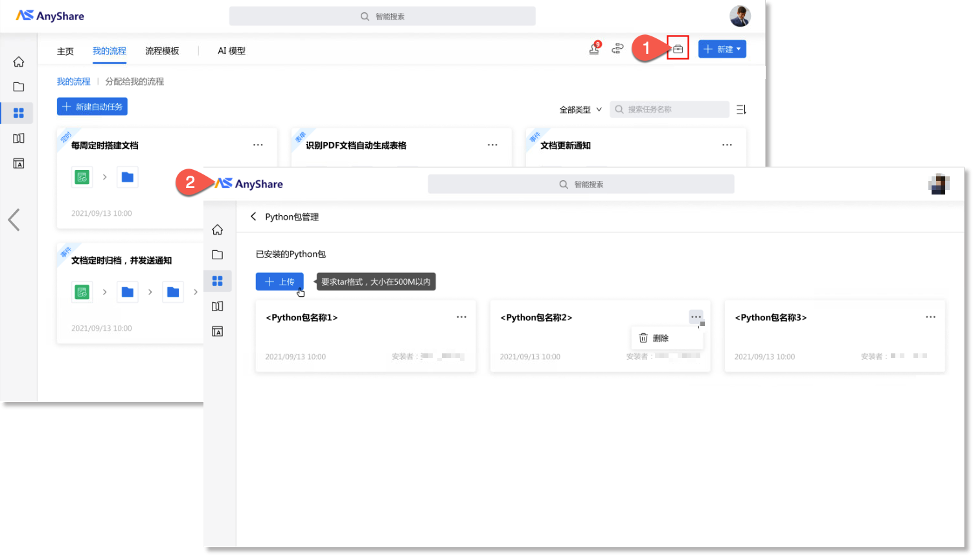
Click “ ” button in Works and select [+Upload] to upload a “.tar” file. AnyShare will automatically installs the package upon upload.
Once installed, users can utilize this package in Python or custom nodes.
Note:
1)Action binding for upload and installation (installation will start automatically after upload).
2)Cannot pause ongoing uploads or installations.
3)Deleted packages become invalid immediately.
Implement Python Nodes in Automated Flow
Python nodes enable custom logic beyond built-in workflow capabilities.
Note: It requires coding skills and AnyShare OpenAPI knowledge to use Python node.
Example: OCR Integration
from aishu_anyshare_api.api_client import ApiClientimport aishu_anyshare_api_efast as efastfrom datetime import datetimeimport requestsimport jsonimport reimport base64def main(doc_id):client = ApiClient(verify_ssl=False)try:json_file = file_download(client, doc_id)text = json_file.contenturl = 'http://10.4.132.197:8507/lab/ocr/predict/general'b64 = base64.b64encode(text).decode()data = {'scene': 'chinese_print', 'image': b64}res = requests.post(url, json=data).json()texts = res['data']['json']['general_ocr_res']['texts']return textsexcept Exception as e:return str(e)def file_download(client: ApiClient, doc_id: str) -> requests.Response:resp = client.efast.efast_v1_file_osdownload_post(efast.FileOsdownloadReq.from_dict({"docid":doc_id})) #type: ignoremethod, url, headers = resp.authrequest[0], resp.authrequest[1], resp.authrequest[2:]header = {}for val in headers:arr = val.split(": ")header[arr[0]] = arr[1].strip()resp = requests.request(method, url, headers=header, verify=False) # type: ignorereturn resp
Code Functionality:
The provided example demonstrates core implementation logic. And this script executes the following core operations:
Retrieves file content via AnyShare SDK and extracts business-required data fields from the OCR's JSON response.
Note: The specific extraction rules and the JSON data structure may vary depending on the OCR model used. You can adjust as needed.
Code Mechanics:
The workflow framework internally encapsulates AnyShare's document operation APIs as a Python SDK, enabling direct calls while automatically handling user authentication tokens. The input/output values of the main() function are recorded in the workflow context, remaining accessible throughout the entire workflow lifecycle.
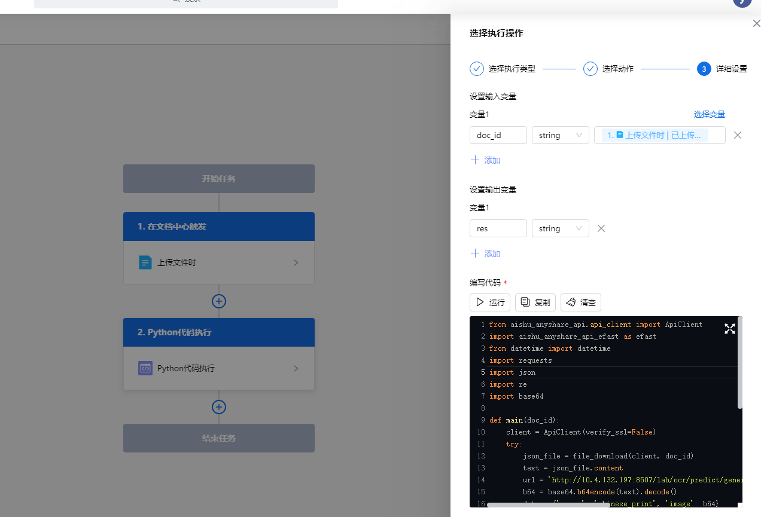
Note:
1) Workflow activates upon file upload events.
2) The Python node accepts an input variable (e.g., doc_id), which carries the document ID of the triggering file for node operations.
3) The Python node supports multiple output variables that directly map to the return values of its main() method.
4) The Python node outputs processed data via return values, making it available for downstream workflow operations such as cataloging and tagging.