






1.6.1 How to create contacts and contact group?
Contacts and contact groups are customizable configurations that enable you to:
• Automatically assign permissions when sharing files.
• Streamline collaboration with predefined members or teams.
› To create
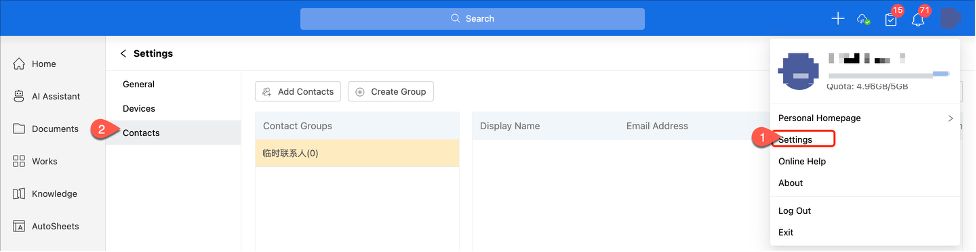
Go to your profile picture, select [Settings] > [Contacts], then add new contacts and contact groups.
› For cross-department collaboration
Simply select the desired contact group instead of manually searching for users and configuring permissions.
AnyShare provides a default temporary contacts group, click [Add Contacts] above to include members in this group.
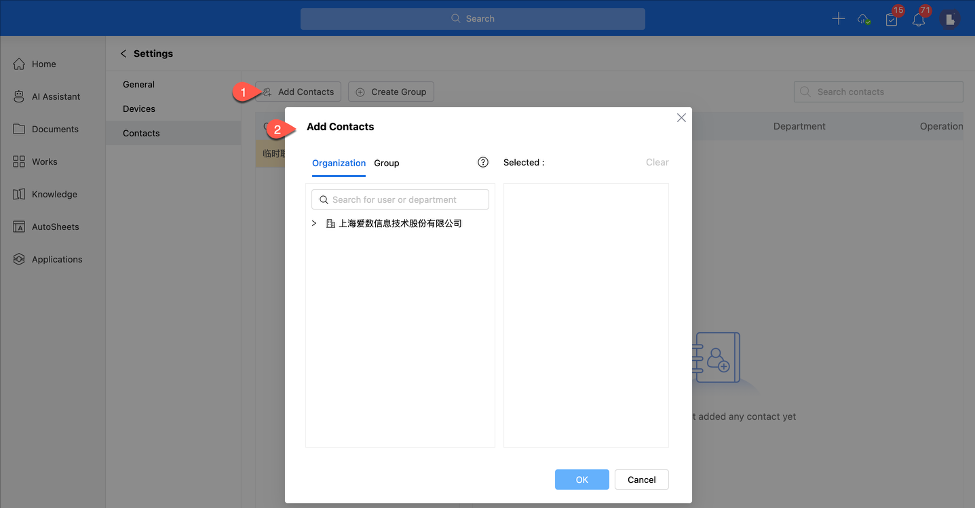
The added contacts will appear in the temporary contacts group.
› To create a new contact group
1. Click [New Group] above and enter a group name in the pop-up window.
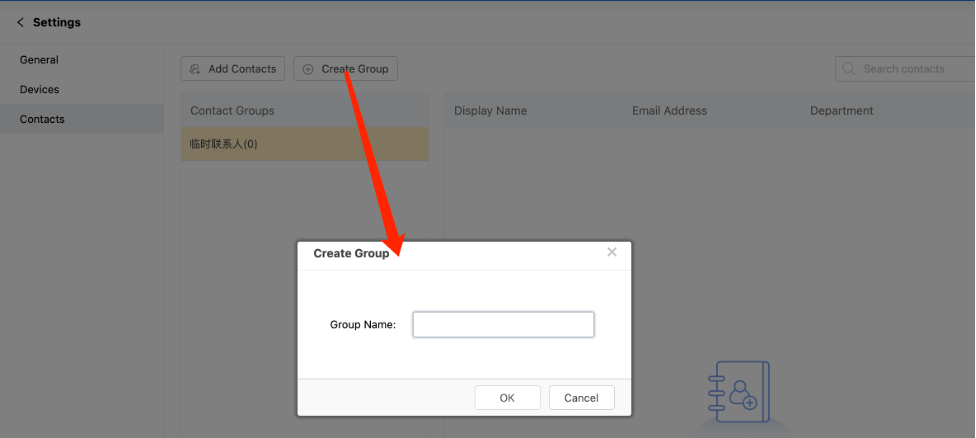
2. Select the desired user group, click [Add Contact], then enter the target username to add members to your contact group.
3. Created groups will appear immediately in your contacts sidebar for quick access.
How to apply contacts and contact groups?
When configuring permissions, you can select existing contacts or contact group to avoid repetitive manual additions. These groups can be reused for future sharing with the same team.