






To extend AnyShare's functionality, leverage its low-code development features in the client to integrate third-party applications, enabling flexible, efficient, and scalable knowledge management.
Centered around content-driven workflows, AnyShare provides tools to streamline multi-user collaboration, simplifying task execution and enhancing productivity through seamless content sharing and task automation.
Low-code Development
Empowers IT administrators to create customized applications for specific business scenarios using drag-and-drop visual development, addressing automation needs without extensive coding.
Supported Integrations
AnyShare supports:
-
- Internally developed apps
- Micro-frontend apps (self-built or hosted)
- Ecosystem partner apps
Note: Users can selectively enable/disable apps as needed.
Integration Guide
To integrate applications into the AnyShare client:
› For Micro-Frontend Framework Integration
When accessing client-specific features (e.g., user information), developers must utilize the client’s micro-frontend framework. Ensure correct dynamic loading of scripts, styles, and assets by configuring the project as detailed in the <AnyShare Plugin Development Handbook>.
› For Ready-to-use Link-type Applications
Simply prepare the required configuration file and complete registration. Once completed, the integrated application will be displayed in the client.
› For Micro-Frontend Applications (Internal Team)
Integration Process:
1) Develop application using client micro-frontend framework
2) Provide application configuration file
3) Release with AnyShare version.
› For Self-Hosted Micro-Frontend Applications (Internal/External Teams)
Integration Process:
1) Develop application using client micro-frontend framework
2) Prepare application configuration file
3) Deploy to self-built server
4) Register configuration via Application Management Service CLI/API
› For Hosted Micro-Frontend Applications (Internal/External Teams)
Integration Process:
1) Develop application using client micro-frontend framework
2) Prepare application configuration file
3) Register configuration via Application Management Service CLI/API
4) Upload plugin for deployment
› For Ecosystem Application Integration
Integration Process:
1) Prepare configuration file
2) Register configuration via Application Management Service CLI/API
Note: All integration methods comply with platform security protocols and maintain system stability
Figure-Flowchart of configuration
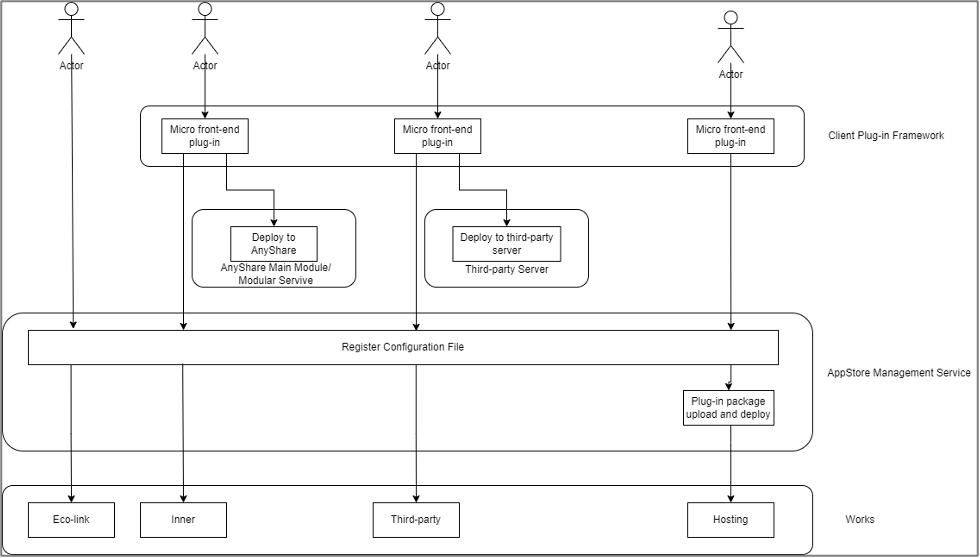
Prepare Application Configuration Files
Applications can be created via API or command line (CMD).
-
- API: Supports only third (third-party) and hosting (hosted) types.
- CMD: Supports inner (built-in), third, and hosting types.
› Configuration Types
1. Inner (Built-in Services)
Managed via centralized release for unified configuration.
Default root port matches the AnyShare access address if not specified.
2. Third (Third-Party Applications)
Update the root field in the configuration file to the deployment server address (e.g., https://ip:7100/root).
Register the app via application management API or command-line tool.
Note: Refer to the "Application Management Service Design Documentation" for API details.
3. Hosting (Hosted Applications)
Host the plugin package on the static service of the plugin module:
Step 1. Copy the app.json configuration file and mini-program package to the appstore pod.
Figure-Code Instance

Step 2. Create the app in the pod and upload the installation package via CLI (see <Plugin Management Documentation> for commands).
Figure-Code Instance

Step 3. Log in to AnyShare to verify the application.
Figure-Expected Result

› Configuration Files
A standard configuration file must include the application name, version information, icon, supported platforms, and application type.
Built-in and third-party applications must specify an HTTPS root directory route to ensure secure integration.
Figure-Code Instance
