






Combined with the AI Model capability, including Large Language Model, OCR Model and Automatic Extraction Model, the Models are introduced into Works to deal with more business scenarios. Here are the brief introductions of each model:
The Large Language Model (LLM) is a deep learning-based technique that utilizes a large amount of textual data for training to acquire rich language-related knowledge. The ability of this model can be fully applied in our flows, such as text summaries, meeting minutes summaries, etc.
The OCR Model is a technique used to convert text in images into computer-readable formats, including image pre-processing and feature extraction. With this model, text recognition can be automatically performed on images or PDF files, and can be applied in business scenarios such as extracting information from invoices or IDs, general text recognition, etc.
The Automatic Extraction Model can automatically identify and extract key information from data, thereby improving the efficiency and accuracy of data processing, which can be applied in customized scenarios, such as extracting labels or custom information from documents.
Next, you will learn more about our Models.
Model Overview
The Models is a like a storehouse that is used to display the AI models applied in the automated flow, supporting users to test the effectiveness of the models, and later supporting users to create and train models. Simply put, if a flow is like two hands that can input data from one app into another, then an AI model is its brain that can extract information from unstructured data sources.
At present, there are many scenarios in our automated flow. To process unstructured data such as documents and sheets, as well as structured data such as ID, business licenses, value-added tax invoices, and train ticket recognition, we have introduced pre-trained AI capabilities into the flow. The pre-trained AI models can be quickly integrated into your flow without the need for data collection, generation, training, and posting.
To empower the model to understand professional documents, we provide customized AI capabilities that require you to upload your own data, annotate, train, and optimize the AI model. For example, by uploading a small number of sample documents, annotating the text information to be extracted, and finally creating a custom model that fits the business scenario, the trained version can be released and used in your flow.
Use Models in Automated Flow
1. Click [AI capability], select a Built-in Capability, e.g.: Summarize Information from Posted File, and then click [Select a file to test].
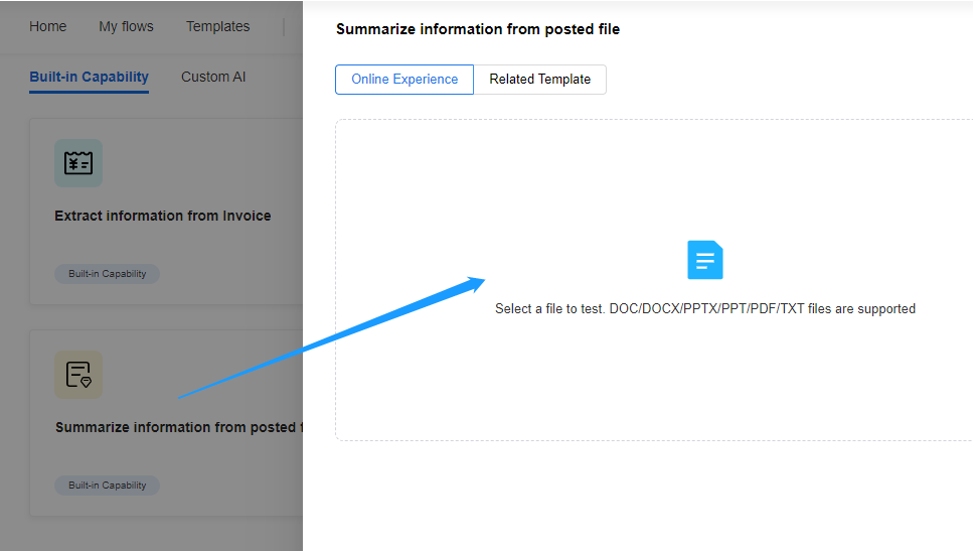
2. Select [Apply to Flow], then a flow that uses the LLM to extract the key information of the file and automatically generates a file to be posted will be generated.